
Versatile Bio Sensor Guide: ExG
Understanding the ExG (EMG, ECG, EOG) sensor on the Versatile Bio
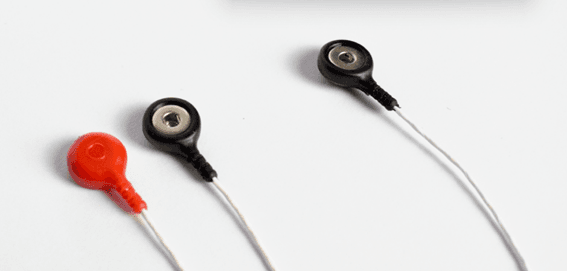
What it measures
The ExG sensors are used to measure electrical activity between a pair of sensors (differential).
They are typically used for one of these measurements:
EMG: Electromyogram, a way of measuring the electrical activity produced by skeletal muscles during contraction.
ECG: Electrocardiogram (also called "EKG"), a measure of the electrical activity of the heart vs time.
EOG: Electrooculogram, a measure of potential between the front and back of the eyeball as a way of determining relative orientation of the eye.
Research Applications
Sports, rehabilitation, kinesiology, psychology, biomechanics, neuromarketing, human factors, etc.
How to use
Connect the sensors to the participant using standard adhesive disposable electrodes like the Aqua-Tac (pictured here).
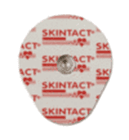
Electrode locations depend on the application (EMG, EOG, ECG). ExG electrodes are bipolar, requiring one electrode positioned on either side of the area to be measured. Consult standard practices for the electrode positions for ECG, EMG, EOG, etc.
Connect as many electrode channels as required via the labeled 2.5 mm ExG connectors on the Versatile Bio amplifier.
Note: All ExG setups require a ground electrode, connected to the GND input.
Initial placement:
- Set to GND. Can be placed anywhere.
- Place ExG bipolar sensors. For measuring EMG, they must be placed along the length of the muscle.
How to clean
To clean and disinfect the cables, do the following:
- Dissconect the sensor from the Versatile Bio.
- The adhesive electrodes are disposable and must be used only once.
- Use Clinell Universal Wipes (For more information, please refer to the following link: Cleaning and Storage Biosignal devices).
- Avoid getting the connectors wet.
- Allow the sensors and all wiring to dry completely before use.
- Autoclave is not recommended, as steam sterilization can damage electronic components.
Connector on Versatile Bio
Visualization filters
To access the data visualization filters, right-click on the signal display in SennsLite or SennsLab.
Under "Notch-Filter" we recommend setting this to the preset matching your country's AC frequency (presets exist for USA/Japan at 60 Hz, and Europe at 50 Hz).
Under "Other Filter" click "enabled" Set filter type to "Bandpass"
For ECG and EOG detection: Set Low (Hz) to 0.5 Hz Set High (Hz) to 30 Hz
For EMG detection: Set Low (Hz) to 1 Hz Set High (Hz) to 100 Hz
Type is "Butterworth" Order set to 4
Output data
Output: ExG data output is reported in µV Data Range: ±420 mV Data Noise: <4 µVRMS (0.5-30Hz) Output Type: Bipolar analog