
How to identify the firmware version of your Ikon EEG amplifier
Step-by-step instructions
You can check the firmware version of your Ikon EEG amplifier in the Recording window of the SennsLite software by following these steps:
- Open SennsLite software and go to the Recording window.
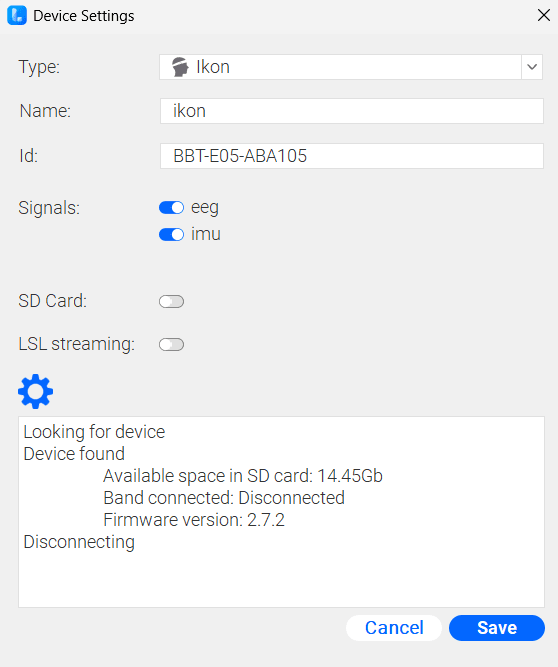
- In the Available sensors section, add a new sensor. The Device Settings window will open.
- In the Device Settings window:
- Select the sensor type (Ikon or Ikon Sleep).
- Enter a name for the device.
- Enter the serial number of the amplifier (Id).
- Once the serial number is entered, click on the blue gear icon (see image below). This action will search for the device and, once it is found, automatically check the firmware version and other device information, such as the available internal memory:
Note
If you cannot see the gear icon, please make sure that you are using the latest version of SennsLite. If not, you can download the installer from the following link: Bitbrain SennsLite